Can you pay with crypto in Japan? How tourists use Binance Pay at PayPay storesWho qualifies, the three ways to pay at the till, what the 10% discount is really worth, and what to do if the payment fails or you need a refund
Yes, you can pay with crypto in Japan now, as long as you are a visitor. Since 30 September 2026, Binance Pay works at shops that accept PayPay, the QR payment app you'll see at tills across Japan: open the Binance app, tap Pay, then PayPay, and either scan the shop's QR code or show yours. You pay in USDT, USDC, BTC, BNB or another supported coin, and the shop receives yen. It doesn't work for people who live in Japan, and a few shops are left out. Below is how to pay at the till, who qualifies, what to set up before you fly, and what to do when it fails.
How to pay with Binance Pay at a PayPay store: three ways
Look for the PayPay sign at the till. In the Binance app, tap Pay on the home screen, then PayPay on the Pay page. Then use whichever of these the shop uses:
- The shop shows a QR code. Scan it, type the amount in yen, tap Pay, then show the staff the completion screen. That screen is how they know you've paid.
- The shop scans you. Show the QR code on the PayPay page to the cashier. Once they scan it, the payment goes through on its own.
- Self-checkout or an automatic till. Choose バーコード決済 (code payment) on the screen, then hold your QR code up to the scanner.
You'll know it worked when the app shows the payment as complete and the till prints a receipt. Before you confirm, the payment page shows the coin, the amount being taken and the exchange rate, so check them there rather than after.
Who can use Binance Pay in Japan, and who can't
According to Binance's own guide, you need all four:
- You are an international visitor, physically in Japan.
- Your phone is connected from a Japanese IP address.
- You have finished identity verification on your Binance.com account.
- You are on the latest version of the Binance app.
People who live in Japan can't use it, and that includes Binance Japan customers. PayPay's notice to its shops lists Binance Pay's region as "global, excluding Japan and the US". Binance also doesn't serve some countries at all; if your account was opened in one of them, this isn't for you. Its user agreement lists them.
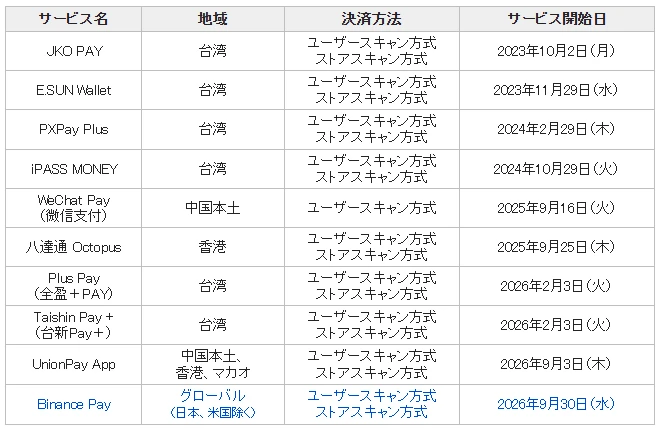
On the shop side, the same notice says Binance Pay is switched on for in-person PayPay shops that use either way of paying, with no fee or paperwork for the shop. One group is excluded: shops that only accept balance paid from a PayPay account (マネー限定加盟店). So a PayPay sign doesn't guarantee it will work. Binance's own wording is "subject to availability and acceptance at participating locations".
What to set up before you fly
- Finish identity verification at home. It can take time, and you don't want to do it at a till. If you don't have an account yet, the sign-up and verification steps are in opening an exchange account.
- Update the Binance app the day before you leave, and check that the Pay page opens. Binance's guide ties the PayPay option to being in Japan, so don't worry if you can't see it at home.
- Hold the coin you want to spend. USDT or USDC is simplest: its value hardly moves between the moment you see the price and the moment you pay. If you hold BTC or ETH, the yen amount stays the same but the number of coins taken moves with the market.
- Sort out data in Japan: a local SIM or eSIM, or Wi-Fi. You need a connection at the till.
- Carry a backup. A card that works abroad and some yen in cash, for shops where it doesn't go through.
Fees, exchange rate and the 10% discount
| Item | What Binance's page says | What to check |
|---|---|---|
| Transaction fee | 0, and no gas fee | The total on the payment page |
| Exchange rate | Coins converted to yen at a real-time market rate, shown before you confirm | Compare it with the USDT/JPY price in the app's markets. The gap is your real cost |
| 10% instant discount | No minimum spend, capped at 6 USDT per user | No start or end date given. See whether the payment page shows a discount line |
| Shop coupons | Up to 7% at BicCamera, Edion and Sundrug | Tap "Claim Coupon" in the app before you pay |
The 6 USDT cap matters more than the 10%. Ten percent of a purchase reaches 6 USDT at 60 USDT, so on a 200 USDT camera the discount is 6 USDT, or 3%. Binance's page doesn't say whether the cap applies per payment or for the whole campaign; the payment page shows what was actually taken off.
Payment failed or PayPay not showing? Check these in order
- No PayPay option on the Pay page. Update the app and restart it. Check that identity verification shows as complete. Then check your connection: the feature needs a Japanese IP address. A VPN changes your IP, so turn it off. Roaming data on a SIM from home is usually routed through your home network, so the IP it shows isn't Japanese. Binance doesn't mention roaming; switching to a Japanese SIM or eSIM, or to the shop's or hotel's Wi-Fi, is the quickest test.
- The shop says it can't take it. It may be one of the excluded shops, or the staff may not know Binance Pay runs through PayPay. Show your PayPay QR code; if it still doesn't go through, pay by card or cash rather than holding up the queue.
- Not enough balance. The payment page shows the coin and amount it needs. Convert to that coin or top up in the app, then try again.
- The screen froze or the connection dropped mid-payment. Don't pay again straight away. Check the payment history on the Pay page first; if the payment is there, show it to the staff. Paying twice means a refund to sort out later.
- Still stuck. Contact Binance support through chat in the app, with the time, the shop name and a screenshot of the error.
Returns and refunds: what happens to your crypto
A refund has to be started by the shop, so ask at the counter with your receipt, and do it while you're still in Japan. Binance's public page doesn't say which account the money comes back to, in which coin, or at what exchange rate. Before you leave the shop:
- Keep the receipt and a screenshot of the payment in the Binance app, including the order number.
- Ask the staff to confirm that the refund has been processed on their side.
- If nothing shows up in your payment history after a few days, contact Binance support with the order number, the shop and the refund receipt.
For expensive things you might return, a card is easier: card refunds and disputes follow rules you already know.
Not eligible? Other ways tourists pay at PayPay stores
If you live in Japan, have a US account, or don't want to use crypto, these are the options:
- The PayPay app itself. Not an option unless you have a Japanese mobile number. PayPay's help page says you need a Japanese mobile number that can receive texts, overseas numbers can't be used, and you can't open an account from abroad.
- A wallet from home. In June 2026 PayPay said 35 overseas payment services from 17 countries and regions work at its shops, including Alipay, WeChat Pay, Kakao Pay, NAVER Pay, Toss, GCash, TrueMoney, Touch 'n Go eWallet, MoMo and Octopus. You scan the shop's PayPay code in your own app, enter the price in yen, and the app converts it to your currency. The full list is in PayPay's announcement.
- Anywhere else: a card that works abroad, plus yen in cash. If your country's wallet isn't on PayPay's list, this is the route. Check your card's foreign transaction fee before you go.
Is spending crypto a taxable event?
In many countries it is. Paying with crypto counts as disposing of it, as if you'd sold it. In the US, the IRS says that exchanging virtual currency for goods or services gives you a capital gain or loss (questions 14 and 16 in its virtual currency FAQ). With USDT or USDC the gain is usually close to zero. With BTC or ETH bought at a lower price, each purchase can be a taxable gain. Wherever you file, keep the payment history from the app so you can work out the cost of what you spent; your tax office's guidance on crypto says how it's treated.
Once you're home, if you want leftover USDT back in your own currency, see how to cash out USDT.
Common questions
Can you pay with crypto in Japan as a tourist?
Yes, at most shops that take PayPay, if you are a visitor physically in Japan with a verified Binance.com account and the latest Binance app. Since 30 September 2026 you can pay with USDT, USDC, BTC, BNB and other coins through Binance Pay. The shop receives yen as usual.
Can tourists use PayPay in Japan?
Not the PayPay app itself, unless you have a Japanese mobile number. PayPay's help page says you need a Japanese mobile number, overseas numbers can't be used, and new accounts can't be opened from abroad. What tourists can do is pay at PayPay shops with a wallet from home, such as Binance Pay or one of the 35 overseas services PayPay lists.
Can I use Binance Pay in Japan if I live in Japan?
No. Binance says the PayPay feature is not available to residents of Japan, and PayPay lists Binance Pay's region as global excluding Japan and the US.
Which coins can I pay with?
USDT, USDC, BTC, BNB and, according to Binance, more than 100 others. The payment page shows which coin will be used and how much before you confirm.
Is there a fee to pay with Binance Pay in Japan?
Binance says there are no transaction fees and no gas fees. Your coins are converted to yen at a real-time rate shown before you confirm, so compare that rate with the market price to see what the payment really costs.
How long does the 10% Binance Pay discount in Japan last?
Binance's page doesn't give an end date. It says 10% off with no minimum spend, capped at 6 USDT per user. Check the campaign in the app before you pay; the payment page shows whether a discount was applied.
Can I get a refund in crypto if I return something?
Ask the shop to refund the payment at the counter, with your receipt. Binance's public page doesn't say which account the refund goes to or at what exchange rate, so keep the payment record from the app and contact Binance support with the order number if the refund doesn't show up.
Information checked 13 October 2026, from Binance's guide to paying with PayPay, PayPay's 30 September 2026 notice to its shops on Binance Pay joining HIVEX, PayPay's help page on what you need to register, PayPay's 29 June 2026 announcement of overseas payment services, and the IRS virtual currency FAQ. The 10% discount and shop coupons are promotions with no published end date. Check them in the app before relying on them.
13 Oct 2026, first published: the three ways to pay, who qualifies, what to set up before you fly, the fees, exchange rate and discount cap, what to do when a payment fails or you need a refund, and other ways to pay if you're not eligible.